Search this blog

Showing posts with label Document. Show all posts

Monday, 4 May 2015

Which UK political party is happiest? Update

There is a general election this coming Thursday in the UK and I thought it would be most interesting to compare the manifesto sentiment of 6 of the parties involved.

Firstly, I downloaded the manifestos and chopped them into sequential 50 word chunks and calculated an average sentiment of each chunk.

For each party, I also created a random manifesto by shuffling the original and again chopping into 50 word chunks to calculate an average sentiment for each chunk. I repeated this on 50 different random manifestos for each party for statistical reasons coming later.

I then placed the sentiments into bins of width 0.04 to create the "histogram of happiness". By plotting the result we can see how the manifestos vary from random as illustrated with this plot for one of the parties.
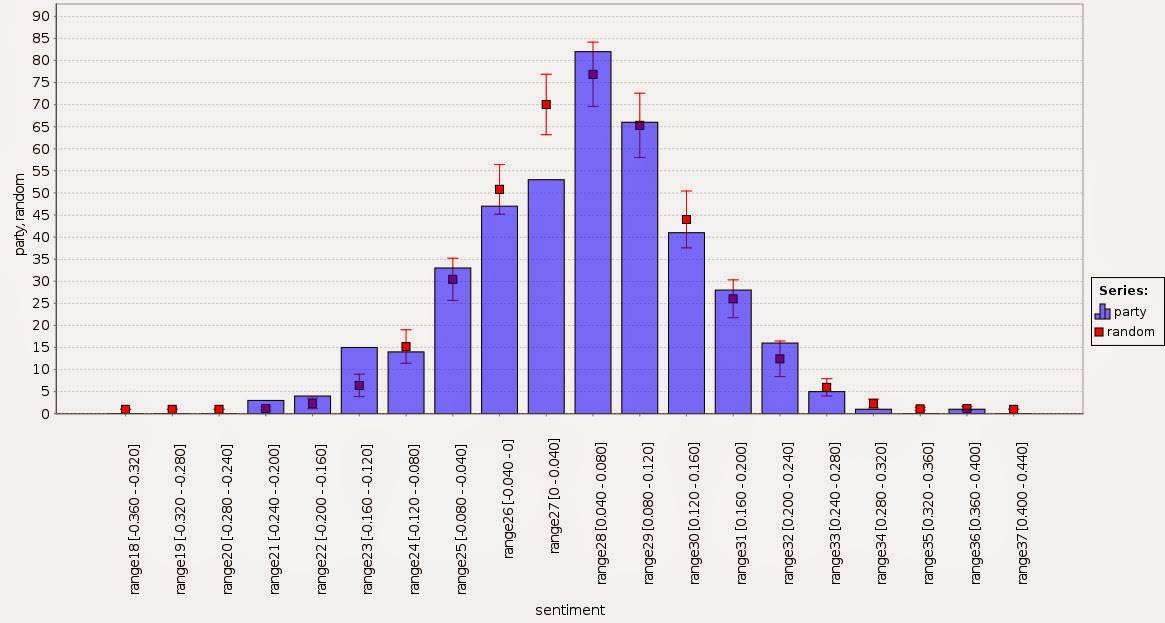


The random points, shown in red, represent the average of the 50 random manifestos with one standard deviation shown as the red bar while the blue bars are the sentiment as measured by the intended word order. The variations are more than can be explained by random chance and we can see for the sentiment between -0.16 and -0.12 there are more 50 word chunks and between 0 and 0.04 there are fewer.

We can calculate a z score for each bin by subtracting the manifesto score from the random result and dividing by the standard deviation of the random result. For the graph above this results in the following graph.


Generally speaking, anything with an absolute z-score greater than 2 has a 1 in 20 chance of happening so the graph above shows that the variations are definitely not random. This is just as well since I'm sure the political parties want to persuade with something that is not just random.

It's quite tricky to compare the 6 parties in a neat way because the graph gets a bit messy. So I decided to focus only on the negative z scores. These represent chunks that happen more often than random and are likely to get noticed more. In other words, uttering something negative or positive is more noticeable than not uttering something.

With this in mind, I combined all the 6 parties to see how they compare.


This graphic is showing only those parts of the manifesto distribution which are more represented than random sampling by two standard deviations. Note that the x axis is not continuous and the smallest circle represents a z score of -2.04 (for the SNP).

What can we see from this? The Green Party has sections of chirpiness but offsets this with sections of negativity. The SNP is both positive and negative but to a lesser extent than the Greens. The Liberal and Labour parties are mostly negative while the Conservatives are showing slight positivity.  By a process of elimination, UKIP has the most positive manifesto. The likelihood of finding a 50 word chunk in their manifesto with a sentiment between 0.24 and 0.28 is significantly greater than random. I declare them the happiest.

Is this going to predict the election? I doubt it but it's likely there are teams of policy wonks drafting these manifestos so it would be funny to make sentiment another thing for them to worry about.

Update: it turns out the Conservatives unexpectedly won. I refined the picture above to bring out the differences between positive and negative: green means more positive than random, red means more negative.  It shows that the Conservative manifesto is resolutely the most middle of the road. Given that elections in Britian are fought on the middle ground I really should have predicted this.


Saturday, 25 October 2014

Windowing and Processing Documents

The text mining extension contains an operator called "Window Document". It takes a document that has been split into tokens (typically words) and creates a collection of new documents from it. Each new document contains a fixed number of tokens corresponding to a "window length" parameter and the movement of the window that moves through the document is dictated by a "step size" parameter. A meta data attribute called "window" is created for each new document; this corresponds to the window within the original document.

So for example, this text

"The cat sat on the mat"

could be split into three windows each of size two if window length is set to two and step size is set to two.

window: 0 - "The cat"
window: 2 - "sat on"
window: 4 - "the mat"

Here's a simple process that illustrates windowing and processing. It's worth noting that the "Process Documents" operator is able to take a collection of documents as input. Note that the process uses version 6.1 of RapidMiner studio so some manual version number editing would be needed to run it in older versions. Note too that you must have the Text Processing extension installed.

The process illustrates a tiny pitfall for the unwary. If one of the tokens is "window" and if the parameter "add meta information" is set to true for the "Process Documents" operator, the resulting example set contains an attribute with the name "window_0". This is because the meta data for the window creates a special attribute in the final example set with name "window" and this would clash with the attribute corresponding to the token. If the parameter "add meta information" is set to false, the attribute corresponding to the token is called "window". In other words, the example set changes in a subtle way depending on the setting of a parameter which can lead to problems.

It's a very small point but I happened to stumble over it recently as I was preparing my contribution to an upcoming text mining book. Here's a teaser because it looks nice :). It is comparing three novels by Jane Austen and how the shape of word frequencies varies for consecutive windows through the books.

The red line is for Mansfield Park, the blue is for Sense and Sensibility and the green is for Pride and Prejudice.


Monday, 21 April 2014

How to read the contents of a file into a macro

I won't bore you with the "why", but suffice to say there are certain situations where it is useful to have the contents of a file contained in a macro. Obviously don't read a multi-Gb file into a macro, it might struggle.

Here's a process to do it.

It's very simple in fact. The trick is to use the "Read Document" operator followed by "Documents to Data". This has the effect of reading the entire contents of a file into a single named attribute in a one row example set. This by itself is useful but from there, it's a simple matter to use "Extract Macro" to make a macro equal to the value of the attribute for the single row.


Tuesday, 25 March 2014

XSLT

I had to transform some XML from one format to another recently for a cool thing that I am doing at the moment - more details soon with luck ;).

The XML in question was contained in a lot of files and I couldn't face editing them so I decided to embrace the power of XSLT and get the transformation done automatically using RapidMiner.

It turned out to be really quite easy and in the interests of giving something back I made a simple version of the process that shows it working.

Here is the process.

This is the input XML (a copy of the XML for a RapidMiner process as it happens)


Close examination shows it contains 5 operators.

The XSLT document input to the "Process XSLT" operator is shown below.


This finds all the operators with name attributes within the input XML and for each writes out the name and also finds and writes out the corresponding class attribute all within a new XML document.

The result of this is shown here.


It has correctly found the 5 operators in the original XML document and has written the name and class for each in a new XML document.

Very cool and powerful and it turned out to be quite easy. The hard bit is knowing how to create the XSLT transform.