Search this blog

Showing posts with label MaterializeData. Show all posts

Sunday, 21 April 2013

Rename by generic names and creating a model: which attributes are used?

The Rename by Generic Names operator can be used to rename attributes so they follow a simple naming convention with a generic stem and an incrementing counter. You would use this for example to get rid of punctuation or mathematical symbols that would prevent the Generate Attributes operator from working.

As an example, if you had regular attributes like

  • Average(height)
  • Minimum(height)
  • Variance(height)

The rename would yield something like

  • att1
  • att2
  • att3
This is more usable but is less understandable.


The other day, I stumbled on an odd side effect of this when building linear regression models on renamed attributes. Fortunately, I don't think it's a problem but there's a workaround anyway.

Firstly then, here is an ultra simple process that builds a linear regression model on some fake data which has had its attributes renamed generically. The example set it produces looks like this.


The regression model looks like this.
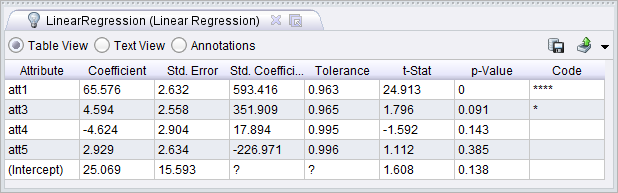


How odd; the names of the attributes before the rename have been used to describe the model. This causes confusion but as far as I can tell the models and weights seem to be fine when they are used in a process. The names are in fact still in the example set and can be seen from the Meta Data View by showing the Constructions column. This points to using the Materialize Data operator as a workaround. By adding this operator just after the rename, the model comes out as follows. 


Less confusing for a human.


Saturday, 16 June 2012

Operators that deserve to be better known: part IV

The "Materialize Data" operator can be very useful. It has the effect of making a fresh copy of the data which I take to mean the example set or sets. Using this operator can often cure some tricky problems.

As an example, here is a process that does a simple cross validation on the sample sonar data set (you may have to change the location for your setup). Inside the cross validation the intermediate training and test data sets are remembered. In a later loop, these saved example sets are recalled. This shows details of how cross validation works.

The "Remember" operator fails to save the correct example if the preceding "Materialize Data" is disabled. In addition, the collection that is recalled later does not display correctly (on my 64 bit Windows machine). Enabling the "Materialize Data" operator restores correct operation.


Sunday, 16 January 2011

Be careful using example sets inside loops

If you have an example set that is used inside a loop it's important to remember that any changes made to attributes will be retained between iterations. To get round this, you must use the materialize data operator. This creates a new copy of the data at the expense of increased memory usage.

Here's an example that shows more and more noise being added to an example set before doing a linear regression.

If you plot noise against correlation and set the colour of the data points to be the attribute "before" you will see that when before = 2 (corresponding to no materialize operation), correlation drops more quickly than it should as noise increases. The noise-correlation curve is more reasonable when before = 1 (corresponding to enabling the materialize operation). The inference is that noise is being added on top of noise from a previous loop to make correlation poorer than expected.


In the example, the order in which the parameters is set is also important. If you get this wrong, the parameters will be reset at the wrong time relative to the materialize operator which causes incorrect results.